Guide · Published September 2026 · Based on publicly documented features
We build DiffLists, so treat this with the scepticism any first-party comparison deserves. What follows is based on the features both tools publicly document, and it includes the places ListDiff is genuinely ahead — a comparison that concluded we win at everything would not be worth reading.
What is identical
More than the marketing on either site would suggest. Both are free with no account or signup. Both state that comparison happens entirely in your browser rather than on a server, so pasted data stays on your device. Both accept the same file types — plain text, CSV, TSV, log and Markdown — by upload or drag-and-drop, and both cap file size at 5 MB. Both offer case sensitivity, whitespace trimming and leading-zero handling as matching options. And both produce the core results: items only in A, items only in B, the intersection, and the union.
For the everyday job of “I have two lists and need to know what changed,” you will get the same answer from either.
Where ListDiff is ahead
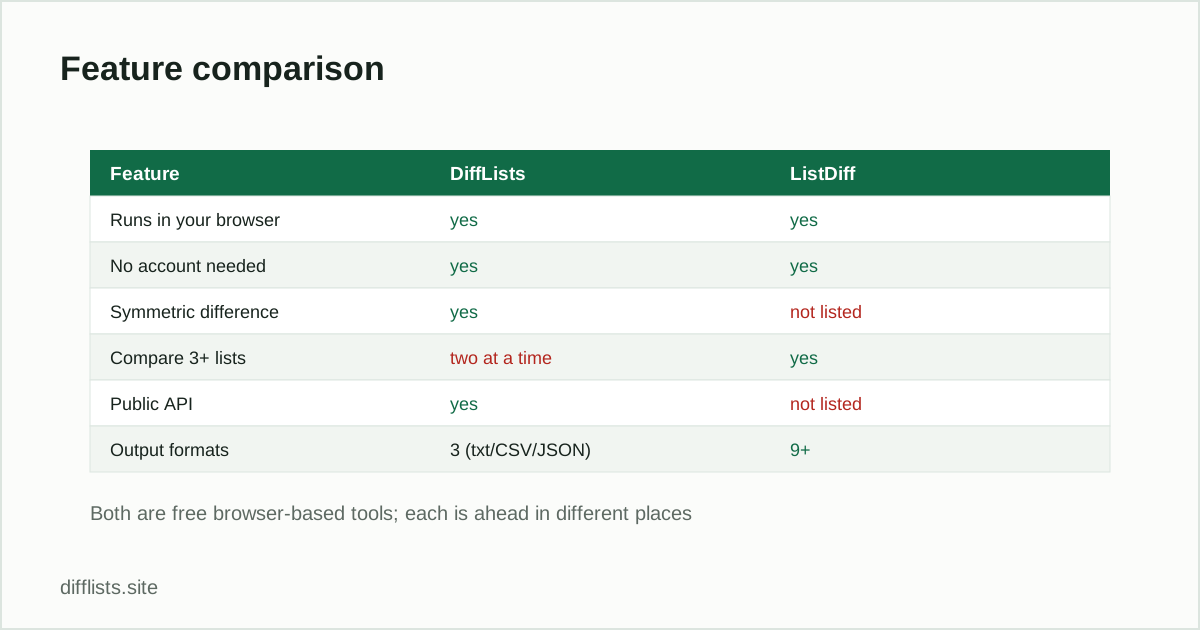
- More than two lists at once. ListDiff has a dedicated multi-list comparison. DiffLists compares two at a time, so three lists means running two passes — the approach described in comparing three or more lists. It reaches the same answer with more steps.
- Output formats. ListDiff exports to numbered lists, Markdown bullets, HTML list markup, hashtags, JSON arrays and quoted strings. DiffLists offers plain text, CSV and JSON. If you want results pasted straight into a Markdown document or an HTML page, that is a real convenience gap.
- A text-fixing tool alongside the comparison tools, which DiffLists does not have an equivalent of.
Where DiffLists is ahead
- Symmetric difference as a first-class result.ListDiff documents A-only, B-only, intersection and union. DiffLists adds the symmetric difference — everything that appears in exactly one list — as its own panel. That is the single most useful result when the question is “what changed between these two versions,” and computing it by hand from the other results is busywork.
- A documented public API. POST to /api/compare and get the comparison back as JSON — no key, no signup, CORS enabled so it works from browser JavaScript. ListDiff does not advertise one.
- An embeddable widget. One iframe snippet puts a working comparison tool on your own page.
- Match-rate statistics. An overlap percentage plus per-list counts of unique items, duplicates removed and blank lines skipped, exportable as a single JSON report — useful when the comparison is evidence for a reconciliation rather than a one-off check.
- Natural sort for results containing numbered or zero-padded identifiers, so
item-2sorts beforeitem-10.
Which to pick
Choose ListDiff if you regularly compare more than two lists at once, or if you need results formatted as Markdown or HTML without reformatting them yourself.
Choose DiffLists if you want the symmetric difference and match-rate statistics without extra steps, if you need to call the comparison from code or embed it in a page, or if you are working with numbered identifiers where natural sort matters.
For a single one-off comparison of two lists, honestly: use whichever one is already open. Both are free, neither uploads your data, and the core answer is the same.
Try the comparison yourself
The fastest way to judge is to run the same two lists through both and see which output you find easier to read. Start with the DiffLists comparison tool, or see how to compare two lists online for the five results explained, and the full tool list for the focused single-purpose tools.
Run your own two lists through it.
Open the comparison toolFrequently asked questions
What's the main difference between DiffLists and ListDiff?
DiffLists reports symmetric difference as a distinct result and offers a documented public API and an embeddable widget. ListDiff can compare more than two lists at once and offers a wider range of output formats.
Are both tools free?
Yes. Both are free to use with no account or signup required, and both state that processing happens in your browser rather than on a server.
Which one should I use to compare three or more lists?
ListDiff has a dedicated multi-list comparison. DiffLists compares two at a time, so a three-way comparison means chaining two passes.
Which one is better for developers?
DiffLists, if you need programmatic access — it has a documented public /api/compare endpoint and an iframe embed. For interactive use in a browser the two are closely matched.
Do either of them upload my data?
Neither states that it does. Both describe processing as happening entirely in the browser, which means the lists you paste stay on your device in both cases.