Guide · Published September 2026 · Based on CompareTwoLists.com’s public site
We build DiffLists, so treat this with the scepticism any first-party comparison deserves. CompareTwoLists.com is a small, free, independently-run tool aimed at exactly the same core job — comparing two lists — so it’s a closer match than most alternatives.
What is identical
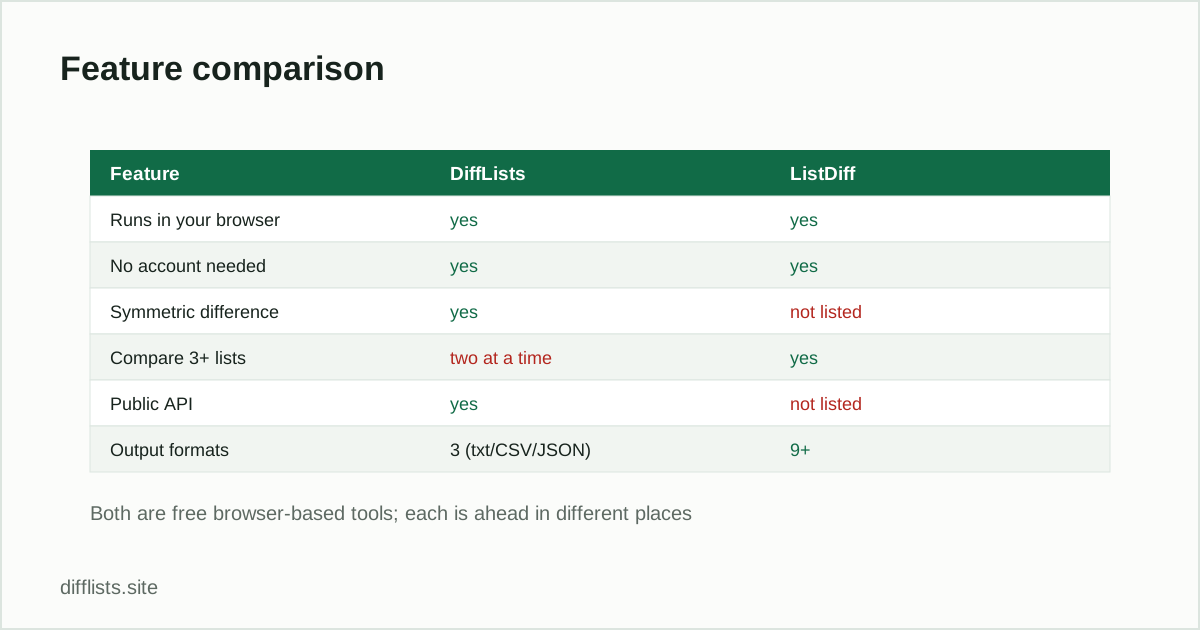
Both are free with no signup required. Both let you paste lists directly or import a file. Both offer a case-sensitivity toggle. Both are aimed squarely at the same core task: paste two lists, find out what’s different.
Where CompareTwoLists.com is ahead
- Built-in regex find/replace.CompareTwoLists.com includes a text replacement tool with regular-expression capture groups as part of the comparison workflow. DiffLists’ matching options (case sensitivity, whitespace trimming, leading zeros) cover common cleanup but don’t include arbitrary regex substitution.
- Automatic sorting of the output, applied by default.
- Instagram mode on the same page as general list comparison, rather than a separate tool.
Where DiffLists is ahead
- Explicit set-operation results.CompareTwoLists.com’s own site doesn’t name intersection or union as distinct outputs — it compares and shows differences. DiffLists reports only-in-A, only-in-B, intersection, union, and symmetric difference as five separate, labeled panels every time.
- No file size ceiling. CompareTwoLists.com caps combined uploads at 4MB and forces a download instead of an inline view for large results. DiffLists has no hard limit and always shows results inline.
- A free, documented public API — POST to /api/compare — and an embeddable widget, neither of which CompareTwoLists.com advertises.
- Match-rate statistics and a dedicated tool set — seven additional single-purpose tools (alphabetizer, duplicates remover, CSV comparer, and more) built on the same engine, alongside the main comparison.
Use CompareTwoLists.com instead if…
You specifically want built-in regex find/replace as part of your comparison workflow, or you prefer having an Instagram-comparison mode on the same page as general list comparison rather than a separate tool.
Use DiffLists instead if…
You want the result broken into explicit intersection, union, and symmetric-difference panels; you’re comparing lists large enough to hit a 4MB combined limit elsewhere; or you want a free API or embeddable widget alongside the comparison tool itself.
Run your own two lists through it.
Open the comparison toolFrequently asked questions
What's the main difference between DiffLists and CompareTwoLists.com?
CompareTwoLists.com bundles regex-based text replacement and a dedicated Instagram-followers mode into its comparison page. DiffLists reports five explicit results — only in List 1, only in List 2, intersection, union, and symmetric difference — and adds a free public API and embeddable widget.
Are both tools free?
Yes. Neither requires an account. CompareTwoLists.com is free and solicits optional donations; DiffLists is free with no donation prompt and no paid tier.
Is there a file size limit?
CompareTwoLists.com caps combined file uploads at 4MB. DiffLists has no hard limit — comparisons run in your browser tab, so the practical ceiling is what your device can hold in memory.
Does either tool have an API?
DiffLists has a free, documented public API (POST /api/compare, no key required). CompareTwoLists.com does not advertise one.
Which one should I use to check Instagram followers?
Both handle it. CompareTwoLists.com has a built-in Instagram mode on its main page; DiffLists has a dedicated Instagram Follower Checker tool plus a guide on exporting and comparing the data.