Guide · Updated September 2026
DiffLists for Instagram: Compare Followers and Following
DiffLists compares Instagram follower and following exports directly in your browser, with no login, no third-party app permissions, and nothing ever uploaded to a server. Paste your official Instagram data export and see mutual follows, one-way follows, and unfollows in one free, private comparison — nothing is sent to Instagram or anyone else.
This matters specifically for Instagram data because so many “unfollower checker” apps ask for your Instagram username and password directly — a practice Instagram’s own Terms of Use warn against, and one that has gotten accounts flagged or suspended. DiffLists never asks for Instagram credentials and never connects to Instagram’s API at all; it only ever sees the plain-text usernames you paste in from your own export, and that comparison happens entirely on your device.
1. Export your official data
From the Instagram app, go to Accounts Center → Your information and permissions → Export your information, and request your followers and following lists (JSON or HTML) — see Instagram’s own guide to reviewing and exporting your information. This is the official, permitted way to get your own list data — avoid third-party apps that ask for your Instagram login, since that violates Instagram’s terms and puts your account at risk.
2. Turn the export into plain lists
Open the exported file and copy just the usernames into two plain lists, one per line: Followers and Following.
3. Compare the two lists
Paste Following into List 1 and Followers into List 2, then compare:
- Only in List 1 (Following) — accounts you follow that don’t follow you back.
- Only in List 2 (Followers) — accounts that follow you but you don’t follow back.
- Intersection — mutual follows.
4. Track changes over time
To see who unfollowed you, export your followers list again after some time has passed, then compare last month’s export against this month’s. The Only in List 1result (last month’s followers not in this month’s list) is exactly who unfollowed you. Keep dated exports as plain text files so you can repeat this whenever you want a fresh comparison.
Everything runs in your browser, so exported follower data is never uploaded anywhere — it’s pasted, compared, and stays on your device.
Worked example
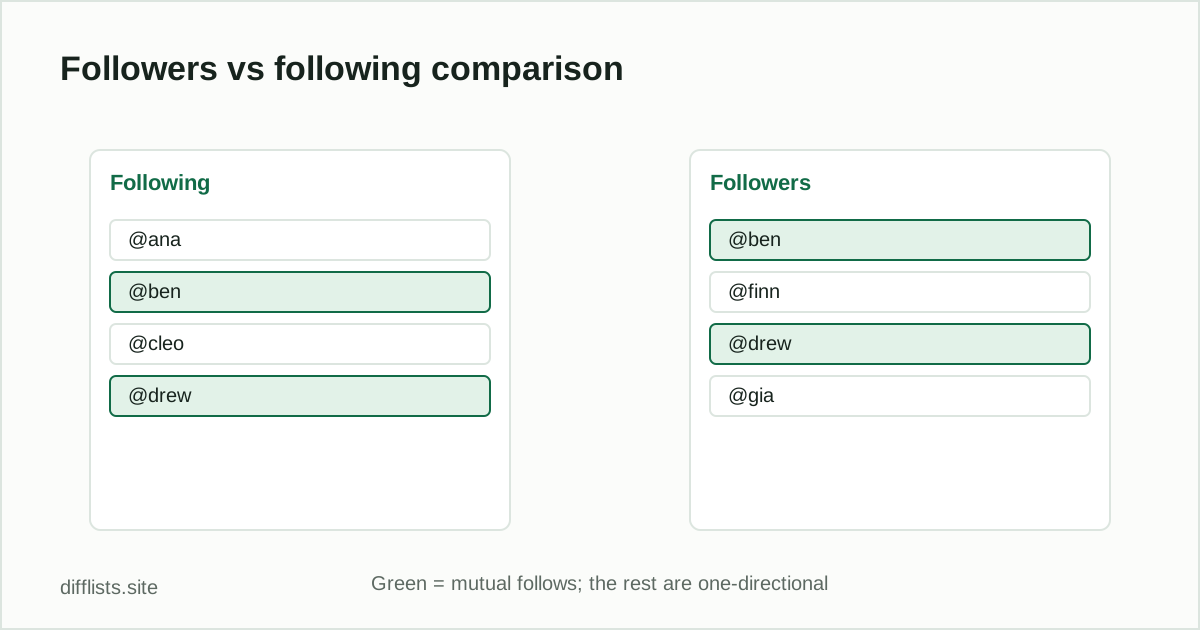
| Following | Followers |
|---|---|
| @ana | @ben |
| @ben | @finn |
| @cleo | @drew |
| @drew | @gia |
Paste Following into List 1 and Followers into List 2. Only in List 1 (@ana, @cleo) is who you follow that doesn’t follow back. Only in List 2 (@finn, @gia) is who follows you that you don’t follow back. Intersection (@ben, @drew) is your mutual follows.
Compare your follower and following lists now.
Open the follower checkerFrequently asked questions
How do I see who unfollowed me on Instagram?
Export your followers list now and again later, then compare the two exports — accounts only in the older list are the ones who unfollowed you.
Is it safe to use a third-party app to check unfollowers?
No — apps that ask for your Instagram login violate Instagram's terms and risk your account. Use Instagram's own data export instead.
What's the difference between followers and following?
Following is who you follow; followers is who follows you. Comparing the two shows mutual follows and one-directional follows in each direction.
How often should I export my follower list?
Weekly or monthly exports give a clean before/after comparison without the noise of daily follow/unfollow activity.
Does DiffLists store my Instagram data?
No. Usernames are compared entirely in your browser and are never uploaded or stored by DiffLists.
Does DiffLists connect to my Instagram account?
No. DiffLists never connects to Instagram's API and never asks for an Instagram login — you paste usernames from your own official data export, and the comparison runs locally in your browser tab.
Can I use DiffLists to compare Instagram followers on mobile?
Yes. DiffLists works in any modern mobile browser — export your data on your phone, copy the usernames, and paste them into the tool the same way you would on desktop.